Render Instance Types
Specify your service's available RAM and CPU.
A Render service's instance type determines its RAM and CPU specs. For most service types, you specify an instance type during service creation and can change it later:

If you scale a service to run multiple instances, each instance uses the same instance type.
A couple of service types handle instance types differently from the others:
- A workflow service defines multiple runnable tasks, each of which can use a different instance type. You specify each task's instance type directly in your code. Learn more.
- Static sites do not have an instance type at all, because they do not perform server-side processing.
Changing a service's instance type
Render Postgres and Key Value instances require brief downtime when changing their instance type.
See details for each:
Other service types redeploy with zero downtime, unless they have an attached persistent disk.
Change your service's instance type using any method listed below.
Note that your service's instance type does not change until the first successful deploy after you update it.
-
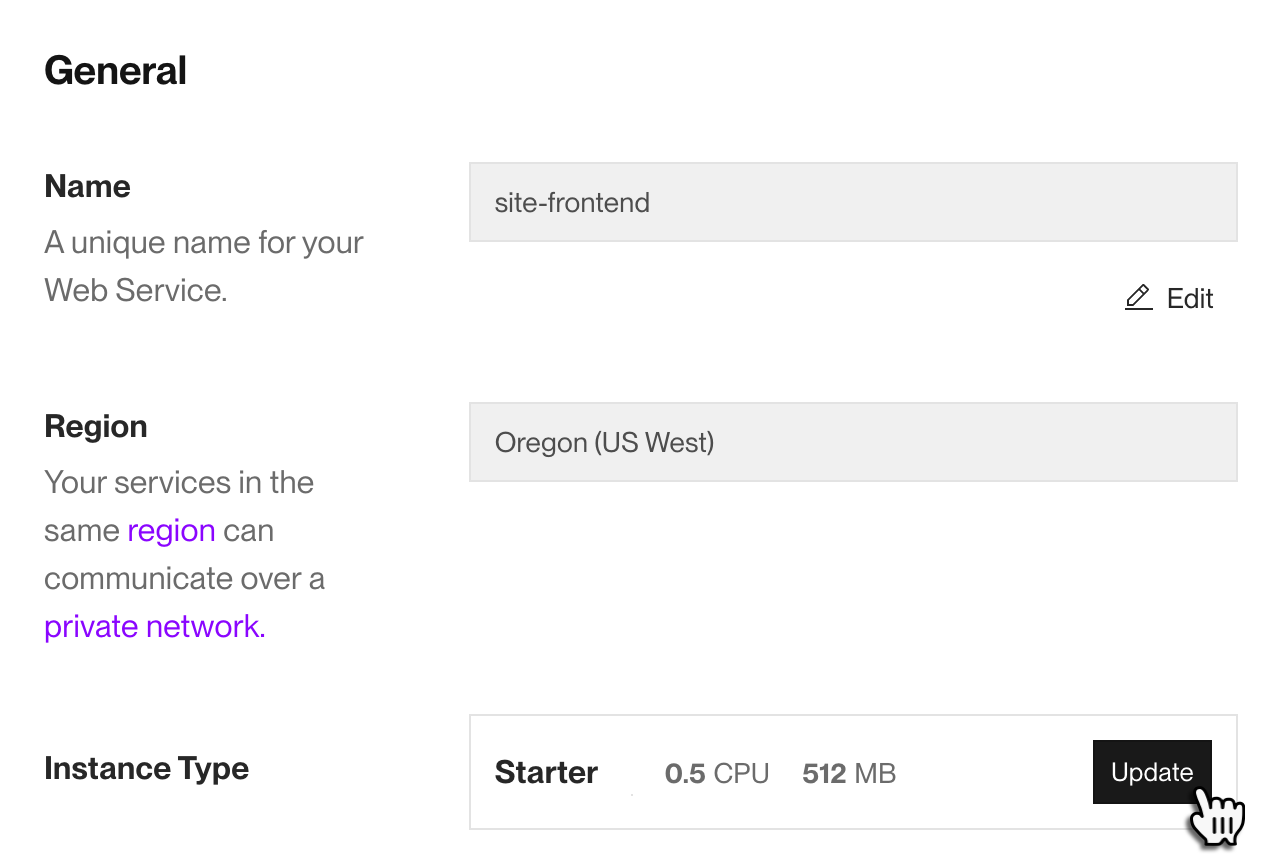
From your service's Settings page in the Render Dashboard, find the Instance Type setting under General:
-
Click Update and select a new instance type.
-
Click Save Changes.

Render automatically triggers a new deploy to apply the new instance type.
Get started with the Render API.
-
Send a request to the Render API endpoint that corresponds to your service type:
- Update service (all non-datastore services)
- Update Postgres instance
- Update Key Value instance
In your request body, provide the new instance type in the
planfield. For Update service only, this field is nested underserviceDetails: -
For Update service only, follow up with a request to the Trigger deploy endpoint to apply the new instance type.
- The Update service endpoint does not trigger a new deploy.
Available instance types
For pricing details on instance types, see the pricing page.
Available instance types vary by service type. Select a tab below to view instance types for a particular service type.
| Instance Type | RAM | CPU |
|---|---|---|
| 512 MB | 0.1 | |
|
Starter | 512 MB | 0.5 |
|
Standard | 2 GB | 1 |
|
Pro | 4 GB | 2 |
|
Pro Plus | 8 GB | 4 |
|
Pro Max | 16 GB | 4 |
|
Pro Ultra | 32 GB | 8 |
| Instance Type | RAM | CPU |
|---|---|---|
|
Starter | 512 MB | 0.5 |
|
Standard | 2 GB | 1 |
|
Pro | 4 GB | 2 |
|
Pro Plus | 8 GB | 4 |
|
Pro Max | 16 GB | 4 |
|
Pro Ultra | 32 GB | 8 |
| Instance Type | RAM | CPU |
|---|---|---|
|
Starter | 512 MB | 0.5 |
|
Standard | 2 GB | 1 |
|
Pro | 4 GB | 2 |
|
Pro Plus | 8 GB | 4 |
All workspaces can use the following instance types for workflow tasks:
| Instance Type | RAM | CPU |
|---|---|---|
|
Starter | 512 MB | 0.5 |
|
Standard | 2 GB | 1 |
|
Pro | 4 GB | 2 |
If you need to handle more resource-intensive workloads, you can request access to the following larger instance types for your workspace:
| Instance Type | RAM | CPU |
|---|---|---|
|
Pro Plus | 8 GB | 4 |
|
Pro Max | 16 GB | 4 |
|
Pro Ultra | 32 GB | 8 |
Your Render Postgres instance type does not affect storage capacity.
Instance type only determines your database instance's RAM and CPU. For details, see Flexible Plans for Render Postgres.
| Instance Type | RAM | CPU | Connection Limit |
|---|---|---|---|
| 256 MB | 0.1 | 100 connections | |
|
Basic-256mb | 256 MB | 0.1 | 100 connections |
|
Basic-1gb | 1 GB | 0.5 | 100 connections |
|
Basic-4gb | 4 GB | 2 | 100 connections |
|
Pro-4gb | 4 GB | 1 | 100 connections |
|
Pro-8gb | 8 GB | 2 | 200 connections |
|
Pro-16gb | 16 GB | 4 | 400 connections |
|
Pro-32gb | 32 GB | 8 | 500 connections |
|
Pro-64gb | 64 GB | 16 | 500 connections |
|
Pro-128gb | 128 GB | 32 | 500 connections |
|
Pro-192gb | 192 GB | 48 | 500 connections |
|
Pro-256gb | 256 GB | 64 | 500 connections |
|
Pro-384gb | 384 GB | 96 | 500 connections |
|
Pro-512gb | 512 GB | 128 | 500 connections |
|
Accelerated-16gb | 16 GB | 2 | 400 connections |
|
Accelerated-32gb | 32 GB | 4 | 500 connections |
|
Accelerated-64gb | 64 GB | 8 | 500 connections |
|
Accelerated-128gb | 128 GB | 16 | 500 connections |
|
Accelerated-256gb | 256 GB | 32 | 500 connections |
|
Accelerated-384gb | 384 GB | 48 | 500 connections |
|
Accelerated-512gb | 512 GB | 64 | 500 connections |
|
Accelerated-768gb | 768 GB | 96 | 500 connections |
|
Accelerated-1024gb | 1024 GB | 128 | 500 connections |
| Instance Type | RAM | Connection Limit |
|---|---|---|
| 25 MB | 50 connections | |
|
Starter | 256 MB | 250 connections |
|
Standard | 1 GB | 1,000 connections |
|
Pro | 5 GB | 5,000 connections |
|
Pro Plus | 10 GB | 10,000 connections |
|
Pro Max | 20 GB | 20,000 connections |
|
Pro Ultra | 40 GB | 40,000 connections |